WordPress plugin · Contact Form 7 integration
Sales pitches are clogging
your contact form. AI sorts them out.
Every Contact Form 7 submission is classified as a genuine inquiry or a sales pitch by Claude, GPT or Gemini — so you never miss a real lead, and your GA4 conversion numbers stop counting cold outreach as wins.
Set it and forget it · BYOK keeps your API key under your control
Why YomuForm exists
Sales spam costs you twice
📥
Real inquiries get buried
Every day a fresh wave of cold outreach lands in the same inbox as your actual leads. The ones that matter end up in 'I'll read it later' folders that no one reads later.
Manual triage burns time, and Slack notifications get tuned out fast when every other ping is a cold pitch.
📉
GA4 conversion data is lying to you
Cold outreach also fires your 'form completed' conversion event, so the conversion rate in GA4 isn't a conversion rate — it's noise. Ad budget calls and A/B test reads start drifting.
Especially painful for B2B sites where 'inquiry = hot lead' is a load-bearing assumption for the whole marketing stack.
How YomuForm fixes it
An LLM classifies every submission, end to end
When Contact Form 7 fires, Claude / GPT / Gemini reads the body and assigns a category with confidence. Per-trigger routing rules let you split notifications by classification.
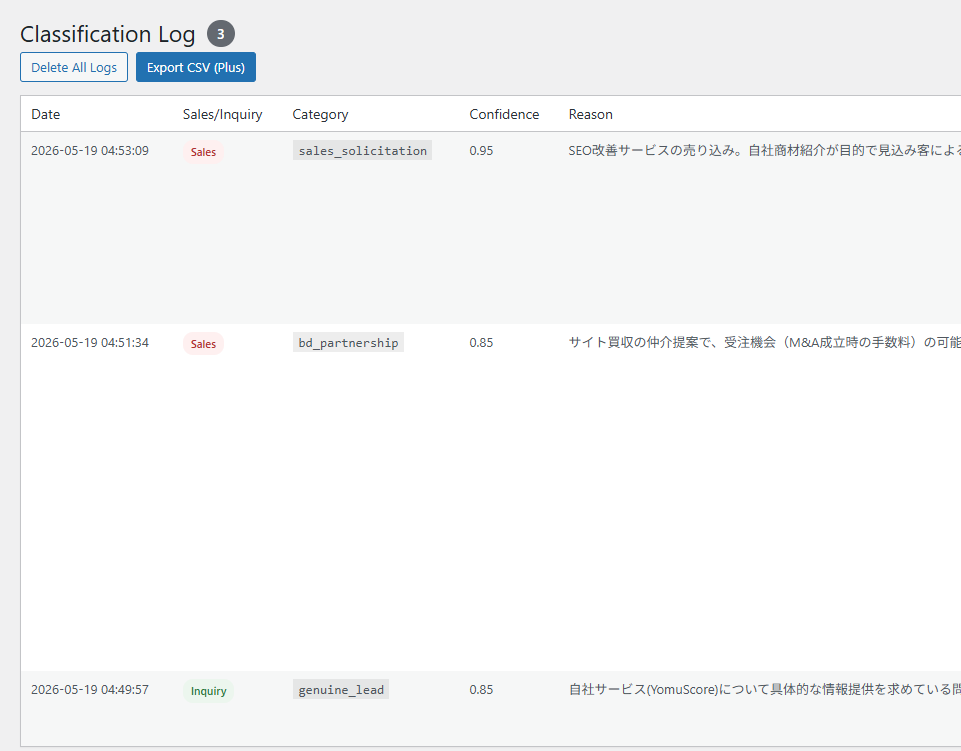
① Classification log
Every submission gets a category and confidence score
Keep the latest 100 classifications with reasoning attached as a rolling buffer (for long-term retention, use Plus's CSV export). Watch the patterns over time and refine the prompt — that's where future accuracy gains come from.
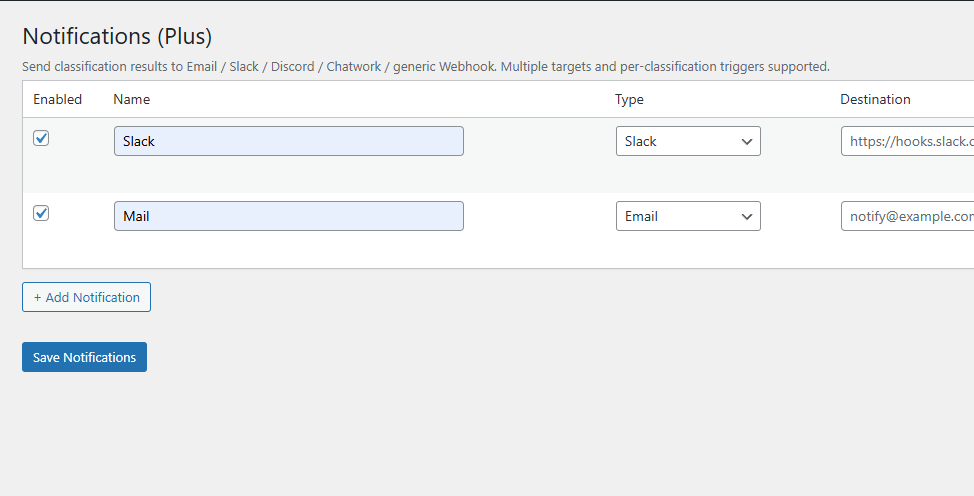
② Notification routing (Plus)
Slack, Discord, Chatwork, generic Webhook in parallel
Send genuine inquiries to Slack, every submission to email, sales pitches to a separate mailbox — whatever combination keeps the right humans alert without overload.
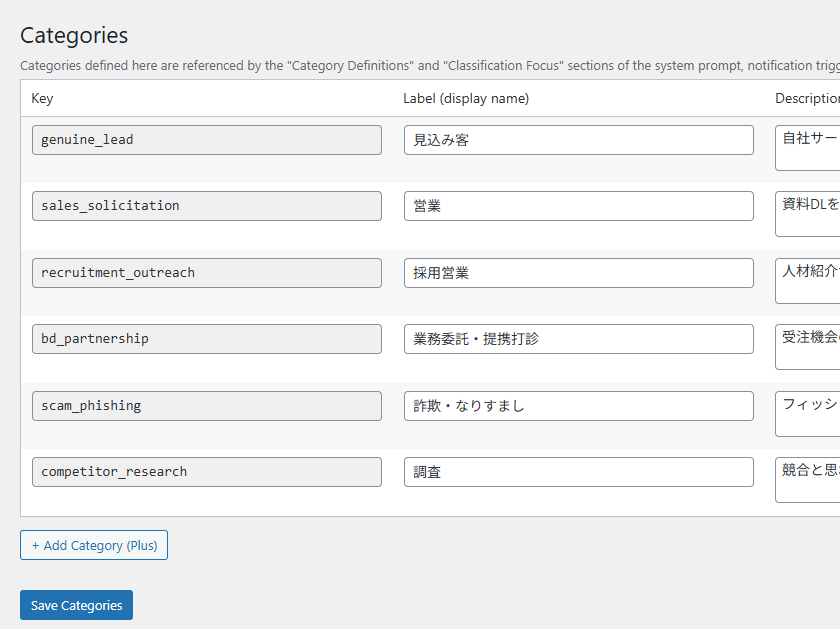
③ Category management (Plus)
Six default categories, fully editable
Beyond the binary 'sales / inquiry' split: genuine lead, recruitment outreach, partnership pitch, scam / phishing, competitor research — add or remove categories to match your industry.
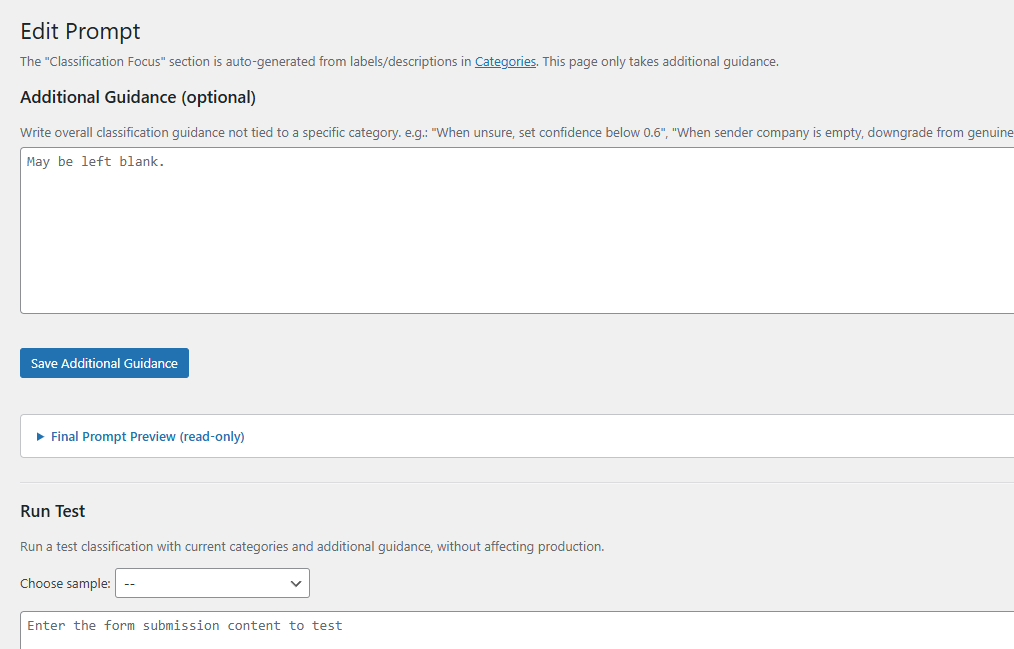
④ Prompt tuning
Write the classifier's rules in plain language
Add operational notes like "if the company field is blank, demote to lower-confidence lead" in natural Japanese or English. Test on sample submissions before pushing live.
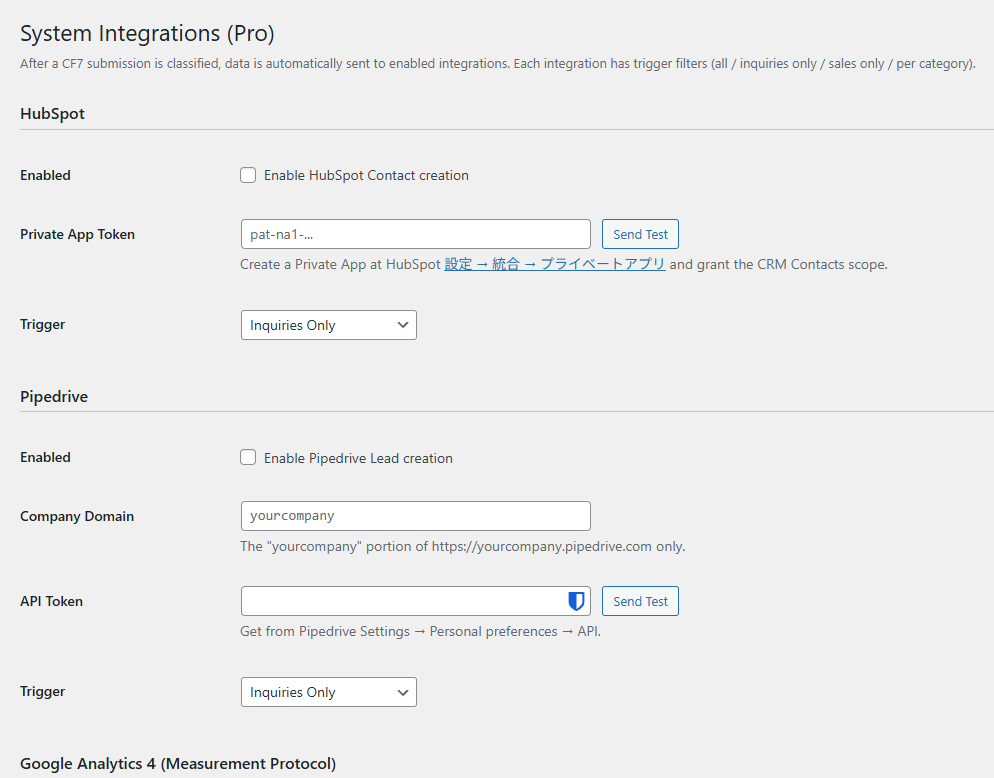
⑤ System integrations (Pro)
Direct to HubSpot, Pipedrive, GA4, GTM
Auto-create CRM contacts from genuine leads, send server-side GA4 events only when the classifier confirms a real inquiry, push to GTM dataLayer for the rest of your pipeline. Your marketing numbers go back to being real.
Supported AI providers
Three providers, BYOK, your data stays yours
Classification requests go from your WordPressdirectly to the AI provider — never through a YomuForm server (Free / Plus).
- ✓API keys live in your site's database, never leave it
- ✓Classification logs keep only the first 500 chars of submission body
- ✓Only license activation / heartbeat ever talks to api.yomuform.com
Anthropic
Claude
OpenAI
GPT
Gemini
Pricing
Three tiers, no surprises
Start on Free, upgrade to Plus or Pro as the use case grows. Switch plans anytime via the Stripe Customer Portal.
Free
¥0forever free
- ✓Contact Form 7 integration
- ✓Sales / inquiry auto-routing (six-category classifier under the hood: genuine lead, sales, recruitment, partnership, scam, competitor research)
- ✓Category management (add / remove / edit labels, descriptions, sales flags)
- ✓1 email notification channel
- ✓Last 100 classification logs
- ✓BYOK (your own API key)
Live on WordPress.org
Plus
¥9,800one-time (~$65)
- ✓Multi-channel notification routing
Slack, Discord, Chatwork, generic webhook, or additional email — each destination receives only the classifications matching its rules. Examples: 'sales pitches → #cold-leads Slack channel only', 'real inquiries → Discord + CRM channel'. Trigger conditions use either the coarse sales / inquiry buckets or per-category filters. Unlimited destinations.
- ✓CSV export
Export the classification log to CSV for long-term archival, in-house BI tooling, or spreadsheet analysis. Load it directly into Excel, Google Sheets, or Looker Studio to visualize per-category trends over time.
1 license = 1 active domain, transferable
Pro
¥980/ month (~$6.50)
- ✓HubSpot / Pipedrive auto-sync
- ✓Server-side GA4 Measurement Protocol
- ✓GTM dataLayer integration
Payments processed via Stripe (cards / Apple Pay / Google Pay). Pricing in JPY; ~$65 for Plus, ~$6.50/month for Pro at recent FX.
Pro subscriptions are cancellable any time from the Stripe Customer Portal.
FAQ
Frequently asked questions
What are the system requirements?+
WordPress 6.0+, PHP 7.4+, Contact Form 7 5.7+. Works on shared hosting — no special server requirements.
Are there additional AI usage fees?+
Every tier uses BYOK — you supply your own Anthropic / OpenAI / Google Gemini API key, and the provider bills you directly. Per-classification cost typically lands in the sub-cent range. This keeps both cost and policy under your control.
Where do form submissions get sent?+
With BYOK, classification requests travel from your WordPress directly to the AI provider. YomuForm's servers never see the submission body. Only license activation / heartbeat calls hit api.yomuform.com.
Where is my API key stored?+
In your WordPress database (wp_options) — never copied off your server. Classification logs retain only the first 500 characters of the submission body, nothing more.
Can I move a Plus license to a different domain?+
Yes. Run 'Deactivate license' on the old site from the plugin settings, then activate the same serial on the new domain. The only constraint is one active domain per license at a time.